What Is an H1 Tag? Importance & SEO Best Practices 2026

You have invested countless hours crafting the perfect webpage content, meticulously researching your topic and polishing every sentence to perfection.
Yet, when you check your website’s performance in search results, your page remains virtually invisible.
The reason behind this disappointing outcome might be something surprisingly simple: your H1 tag. Many website owners, content creators, and digital marketers overlook this seemingly basic HTML element, not realizing that it plays a critical role in both search engine optimization and user experience—often addressed through professional on-page SEO services.
So, what is an H1 tag, and why does it matter so much? This comprehensive guide takes you deep into the world of H1 tags, covering everything from their technical foundation to their strategic implementation and how they fit into a well-optimized on-page SEO strategy.
What Exactly is an H1 Tag?
An H1 tag represents the highest-level heading in HTML’s hierarchical structure of content organization. When visitors land on your webpage, the H1 tag is typically the first and most prominent text element they encounter. It functions as the headline of your content, similar to how a newspaper article uses a bold, attention-grabbing headline to convey its main topic at a glance.
From a technical perspective, H1 tags are written in HTML code using the format <h1>Your Heading Text Here</h1>. This simple markup plays a key role in on page SEO by turning ordinary text into a visually distinct element that stands out from regular paragraph content. By default, browsers display H1 text larger and bolder than surrounding text, creating a clear visual hierarchy that guides readers smoothly through your page.
The Visual And Functional Characteristics Of H1 Tags Include:
- Larger font size compared to body text, typically ranging from 24 to 36 pixels, depending on your website’s design.
- Bold or semi-bold font weight that creates visual emphasis and draws the eye.
- Prominent placement at the top of the main content area, above all other text elements.
- Semantic meaning that tells browsers, assistive technologies, and search engines that this text represents the page’s primary topic.
Where Do H1 Tags Appear on Your Website?
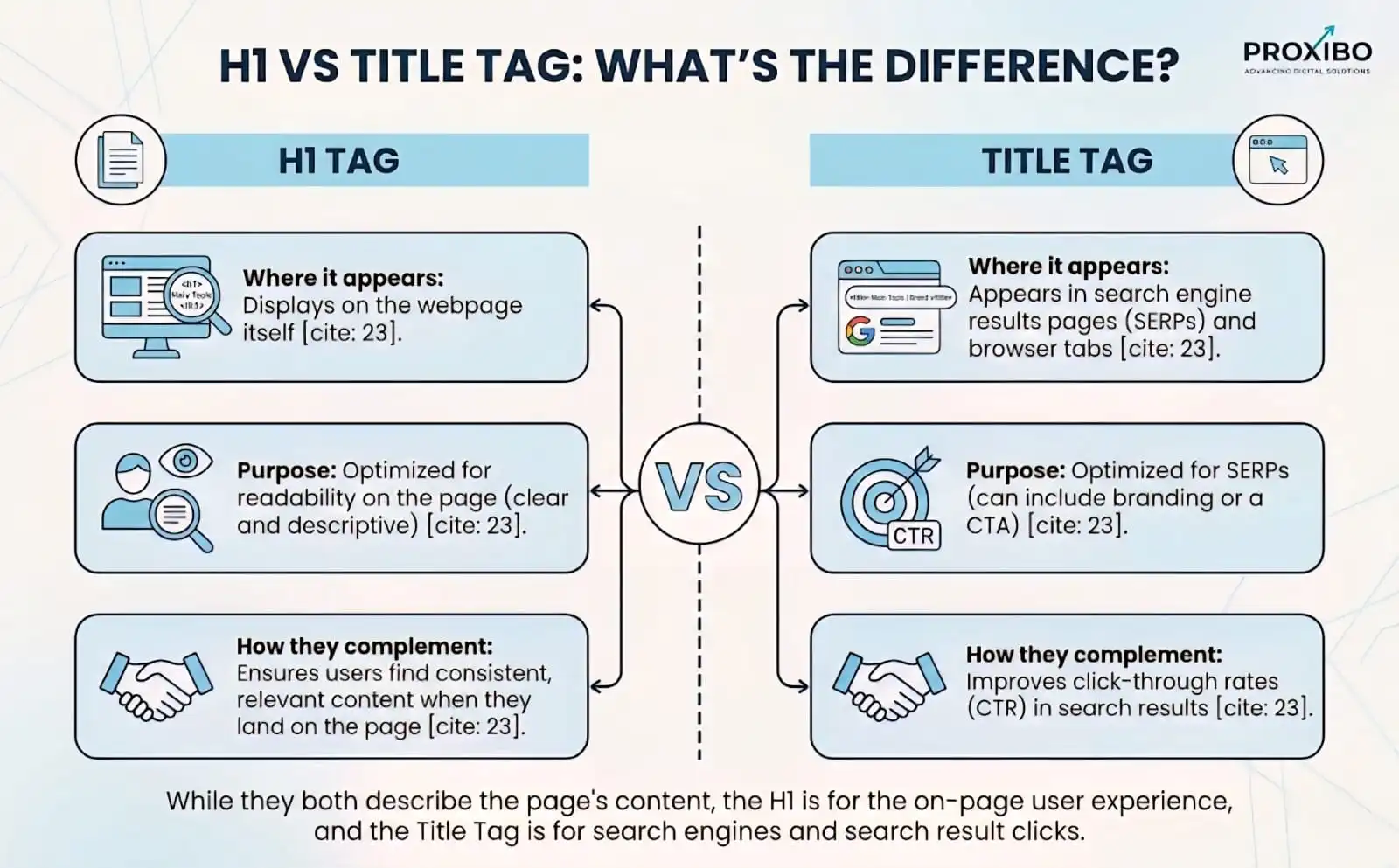
Understanding the distinction between H1 tags and title tags is crucial for effective SEO. While title tags appear in browser tabs and search engine results pages, H1 tags are visible directly on the webpage itself. When someone clicks through to your site from a search result, the H1 tag is what they see first upon arrival.
The placement and usage of H1 tags vary depending on the type of page:
- Blog posts and articles: The H1 tag serves as the article title, appearing prominently above the author byline and publication date
- Product pages: The H1 typically displays the product name or model number, helping visitors immediately confirm they’ve reached the right product
- Service pages: The H1 describes the specific service offered, making it clear what solutions the page provides
- Landing pages: The H1 communicates the main value proposition or offer, often incorporating persuasive language
The Critical Role of H1 Tags in Search Engine Optimization
How Search Engines Interpret H1 Tags
Search engines like Google deploy sophisticated crawlers that systematically scan and analyze every element of your webpage to understand its content and determine its relevance for various search queries. H1 tags occupy a special position in this analysis because they provide a clear, unambiguous signal about the page’s primary topic.
When a search engine crawler encounters an H1 tag, it interprets this as the most important textual element on the page. This interpretation influences how the search engine categorizes your content and matches it with user queries. The H1 tag essentially tells search engines, ‘This is what this page is fundamentally about”.
Research conducted by Ahrefs,analyzing millions of web pages, revealed compelling evidence about the importance of H1 tags. Their study found that pages with properly optimized H1 tags consistently achieved better rankings compared to pages lacking clear H1 implementation.
The SEO Impact Of H1 Tags Manifests In Several Ways:
- Content relevance signals: H1 tags help search engines quickly identify the topic and categorize your page appropriately in their index
- Keyword optimization: When your H1 includes relevant keywords that match user search intent, it strengthens the page’s relevance for those terms
- Content structure understanding: H1 tags work in conjunction with H2, H3, and other heading tags to show search engines how your content is organized
- User experience indicators: Pages with clear H1 tags typically have better engagement metrics, which search engines interpret as quality signals
How H1 Tags Enhance User Experience
While SEO benefits are significant, the impact of H1 tags on user experience is equally important and often more immediate. Modern web users rarely read content word-for-word; instead, they scan pages to determine if the content meets their needs.
Consider the psychology behind user behavior. When someone searches for ‘how to bake chocolate chip cookies,’ they click a result expecting to find exactly that information. If they land on your page and see an H1 that reads ‘The Complete Guide to Baking Perfect Chocolate Chip Cookies,’ they receive instant confirmation and are likely to stay and read. However, if the H1 is vague, generic, or doesn’t mention cookies at all, they may immediately hit the back button.
The Technical Architecture of H1 Tags and Content Hierarchy
Understanding HTML Heading Structure (H1 Through H6)
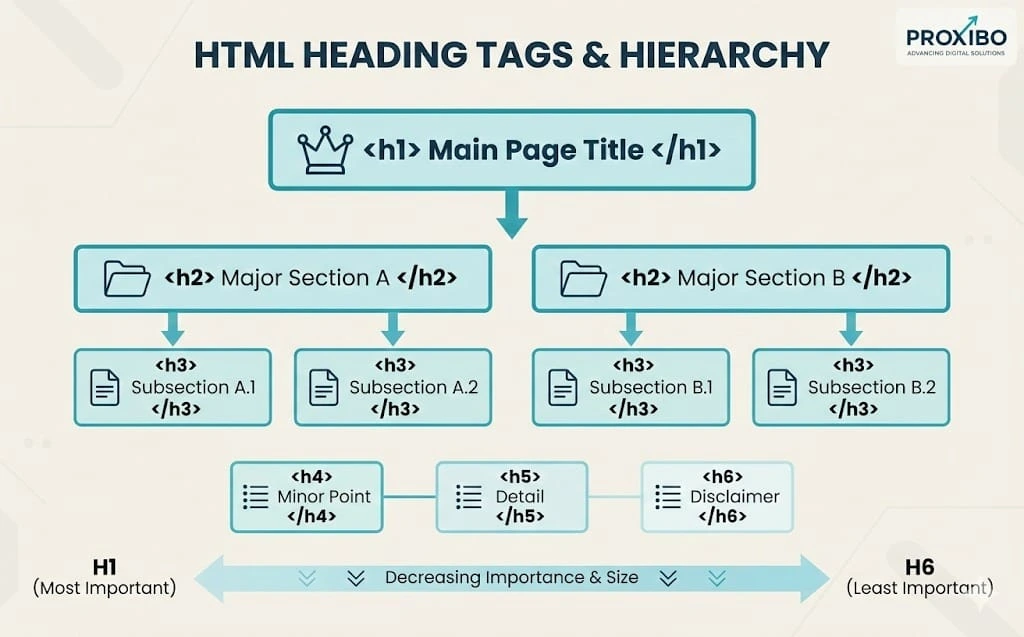
HTML provides six levels of heading tags, from H1 through H6, creating a hierarchical structure that organizes content in a logical, nested manner. This hierarchy mirrors the way we naturally organize information in documents, with main titles, chapter headings, section titles, and sub-sections.
The H1 tag sits at the apex of this hierarchy as the most important heading. It should be used for the main topic of the page. Below it, H2 tags mark major sections, H3 tags denote subsections within those major sections, and so on. This cascading structure helps both search engines and users understand the relationships between different parts of your content.
Think of Heading Hierarchy Like a Book’s Structure:
- H1 = Book Title: The overarching topic that encompasses all content on the page
- H2 = Chapter Titles: Major sections that break down the main topic into distinct parts
- H3 = Section Titles: Subdivisions within chapters that explore specific aspects
- H4 = Subsection Titles: Further breakdowns for detailed explanations
- H5 and H6 = Fine Details: Rarely needed but available for extremely detailed content
The One H1 Per Page Rule: Why It Matters
One of the most debated questions in web development circles concerns whether pages should have one or multiple H1 tags. While HTML5 technically allows multiple H1 tags within different sectioning elements, SEO best practices strongly recommend using only one H1 tag per page.
How Do You Craft High-Performance H1 Tags
Starting With User Intent: The Foundation of Effective H1 Tags
The most effective H1 tags begin with a clear understanding of user intent. Before writing a single word, ask yourself: What specific question is this page answering? What problem are visitors trying to solve? What action should they take after reading?
User intent falls into several categories: informational (seeking knowledge), navigational (looking for a specific site or page), transactional (ready to purchase or take action), and commercial investigation (researching before buying). Your H1 tag should align with the dominant intent of your target audience.
For informational queries, use phrases like ‘Complete Guide to,’ ‘How to,’ ‘What Is,’ or ‘Understanding.’ For transactional queries, incorporate action words like ‘Buy,’ ‘Get,’ ‘Order,’ or ‘Download.’ For commercial investigation, use comparative language like ‘Best,’ ‘Top,’ ‘Review,’ or ‘Comparison.’
Keyword Integration: Strategic Placement Without Stuffing
Including your target keyword in the H1 tag is essential for SEO, but the integration must feel natural and reader-friendly. Keyword stuffing, the practice of cramming multiple keywords into a heading, damages both user experience and SEO performance. Modern search algorithms are sophisticated enough to recognize and penalize this practice.
The ideal approach places your primary keyword near the beginning of the H1 tag, where it carries the most weight. However, don’t sacrifice readability for keyword placement. If the keyword flows more naturally in the middle or end of the heading, that’s perfectly acceptable.
Examples of Natural Keyword Integration:
- Good: ‘Digital Marketing Strategies for Small Business Growth in 2026.’
- Good: ‘How to Choose the Best Running Shoes for Marathon Training.’
- Poor: ‘Digital Marketing Small Business Marketing Strategies Business Marketing.g.’
- Poor: ‘Running Shoes Best Running Shoes Marathon Running Shoes Guid.e.’
Optimal H1 Tag Length: Finding the Sweet Spot
The ideal H1 tag length balances descriptiveness with scannability. Research suggests that H1 tags between 20 and 70 characters perform best across most contexts. This range provides enough space to clearly communicate your topic while remaining concise enough for visitors to grasp quickly.
Character count matters for several reasons. Very short H1 tags (under 20 characters) often lack the specificity needed to clearly convey the page’s topic. ‘Cookies’ tells users very little compared to ‘How to Bake Chocolate Chip Cookies.’ Conversely, excessively long H1 tags (over 70 characters) become difficult to scan and may appear cluttered or overwhelming.
Action-Oriented Language: Driving Engagement Through Words
Action words transform passive headings into engaging invitations. Instead of simply stating a topic, action-oriented H1 tags promise specific benefits or outcomes. This approach aligns with how people search; they’re looking for solutions, answers, and results, not just information.
Powerful Action Words for H1 Tags Include:
- Learn: ‘Learn Advanced Python Programming Techniques.’
- Discover: ‘Discover the Secret to Perfect Sourdough Bread.’
- Master: ‘Master Digital Photography in 30 Days.’
- Build: ‘Build Your First Mobile App Without Coding.’
- Transform: ‘Transform Your Garden Into a Pollinator Paradise.
What Are Common H1 Tag Mistakes and How to Avoid Them?
Mistake 1: Missing H1 Tags Entirely
Surprisingly, many websites launch pages without any H1 tag at all. This happens most frequently with custom-designed pages, landing pages, or when content management systems aren’t properly configured. Pages without H1 tags miss critical SEO opportunities and leave visitors without clear guidance about the page’s purpose.
To check if your page has an H1 tag, you can view the page source (right-click and select ‘View Page Source’) and search for ‘<h1>’.
Mistake 2: Using Identical H1 and Title Tags
While your H1 and title tag should be closely related and target the same primary keyword, making them identical represents a missed opportunity. The title tag appears in search results and should be optimized for click-through rates, potentially including your brand name or compelling modifiers. The H1 tag appears on the page itself and can focus more directly on the content’s main topic.
Mistake 3: Generic or Vague H1 Tags
Generic H1 tags like ‘Welcome,’ ‘Home,’ or ‘Services’ provide no meaningful information about page content. These vague headings fail to communicate value to visitors and offer no SEO benefit. Every H1 tag should be specific and descriptive, clearly indicating what unique information or value the page provides.
Replace generic H1 tags with specific, benefit-driven alternatives. Instead of ‘Services,’ use ‘Professional Web Design Services for Small Businesses.’ Instead of ‘Welcome,’ use ‘Discover How Our AI-Powered Analytics Increase Sales by 40%.’
Mistake 4: Mismatched H1 Tags and Page Content
Perhaps the most damaging mistake is creating an H1 tag that promises content the page doesn’t deliver. If your H1 reads ‘Complete Guide to Email Marketing’ but the page only covers subject line writing, visitors will feel misled.
Ensure perfect alignment between your H1 tag and page content. The H1 should accurately reflect the scope and depth of information provided. If your content covers a broad topic comprehensively, the H1 can make expansive promises.
Testing, Measuring, and Optimizing H1 Tag Performance
Tools for Auditing H1 Tags Across Your Website
Regular H1 tag audits help identify issues before they impact your SEO performance. Several tools make this process straightforward and comprehensive. Screaming Frog SEO Spider can crawl your entire website and generate reports showing which pages lack H1 tags, have multiple H1 tags, or use duplicate H1 tags across different pages.
Google Search Console provides insights into how your pages perform in search results, including which queries trigger impressions. Comparing your H1 tags with top-performing queries can reveal optimization opportunities.
A/B Testing H1 Tags for Maximum Impact
While changing H1 tags doesn’t produce instant results, systematic testing over time can reveal what resonates best with your audience. Track key metrics before and after H1 tag changes, including organic traffic, bounce rate, time on page, and conversion rates.
When testing H1 tag variations, change only one element at a time so you can identify what drives results. Test different approaches, such as question-based H1 tags versus statement-based ones, shorter versus longer headings, or H1 tags with numbers versus those without.
Conclusion: Mastering H1 Tags for Long-Term SEO Success
What is an H1 tag? It’s the main heading on your webpage that tells both visitors and search engines what the page is about. Proper H1 tags SEO optimization improves your rankings while making content easier for people to understand and navigate.
Start optimizing your H1 tags today to improve search visibility and user engagement. For expert support with complete on-page SEO services—including H1 tags, title tags, and content structure—Proxibo provides professional digital marketing services that deliver measurable improvements in your website’s search performance.
The ideal title tag length is 50–60 characters. Use the title tag examples from this guide to create effective titles for different page types. Begin with the most important pages and systematically optimize the rest of your site for long-term SEO success contact now if you need expert guidance.
Frequently Asked Question
The ideal H1 tag length is between 20 and 70 characters. This range is long enough to be descriptive but short enough to be scannable.
out H1 tags miss important SEO opportunities and confuse both visitors and search engines. Search engines have difficulty understanding the main topic, which can hurt rankings.
While HTML5 technically allows multiple H1 tags, SEO best practice recommends using only one H1 per page. Multiple H1 tags create confusion about the main topic and dilute the SEO value.
ABOUT THE AUTHOR

Related Posts