
Does Schema Markup Help SEO? Proven Benefits & Implementation Guide

You’re searching for a recipe on Google. One result catches your eye. It shows star ratings, cooking time, and calorie count right in the search results. You click it immediately. That’s schema markup in action.
Does schema markup help SEO? This question matters to anyone serious about improving online visibility and search performance.
Schema markup helps search engines better understand your content and enhances how your pages appear in results—especially when implemented alongside professional on-page SEO services. This guide will show you exactly how schema markup works and why it’s essential for your website.
You’ll learn what it is, how it improves your rankings, and how to add it to your website. Let’s start with the basics.
What is Schema Markup?
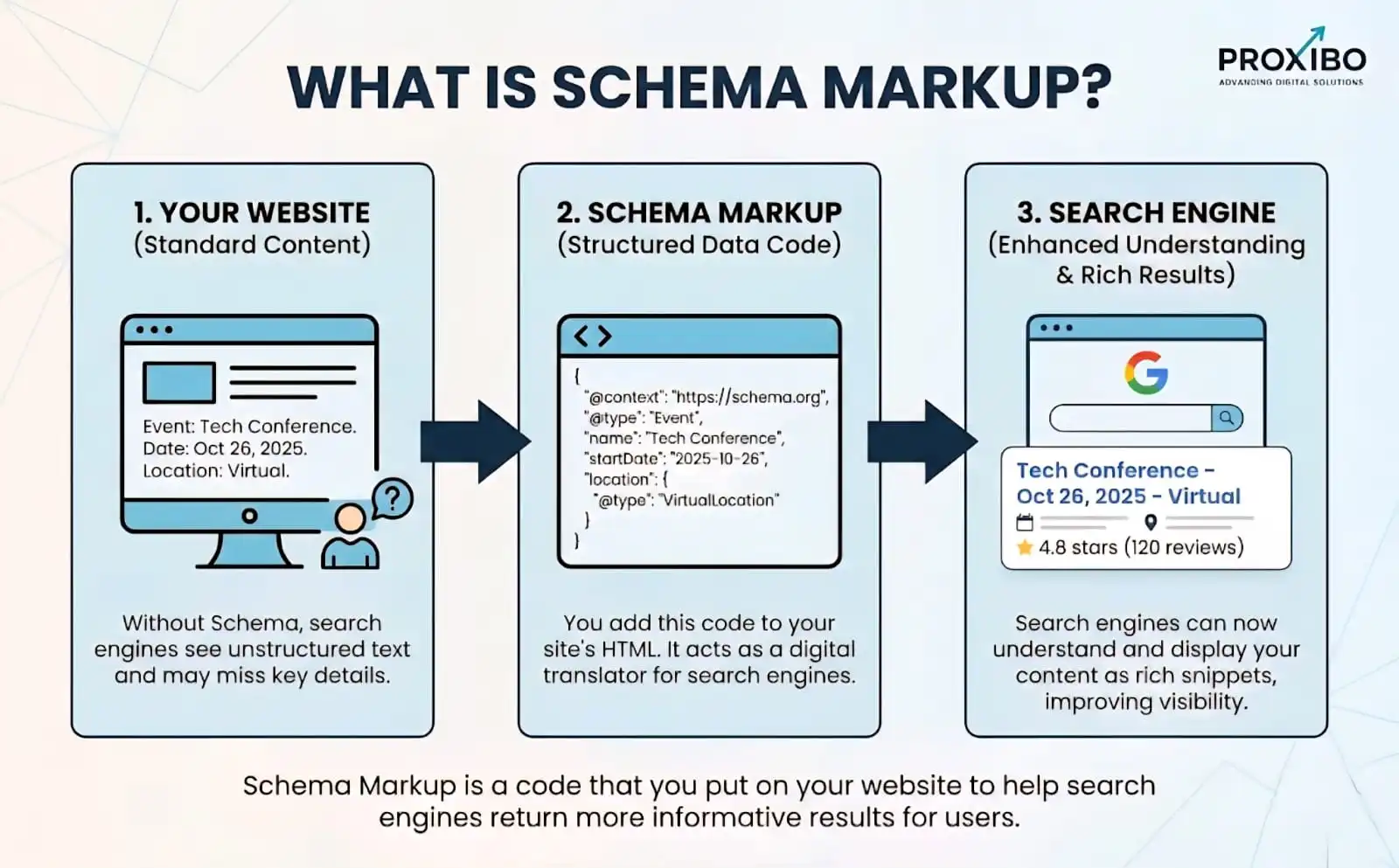
Schema markup is special code you add to your website. It helps search engines understand your content better. Think of it as labels that explain what your information means.
Regular HTML tells browsers how to display your content. Schema markup tells search engines what your content represents. Is that number a price, a rating, or a date? Schema provides these answers.
Schema.org created a shared vocabulary for this code. Google, Microsoft, Yahoo, and Yandex all support it. This makes schema the standard language for structured data.
What are Different Types of Schema Markup Format?
JSON-LD (Recommended Choice)
JSON-LD, or JavaScript Object Notation for Linked Data, is Google’s top pick as it sits separately in a <script> tag without cluttering HTML.
This makes it easy to update via Google Tag Manager; 80% of top-ranking pages now use it for flexibility during site redesigns.
Microdata (HTML-Embedded)
Microdata weaves schema directly into HTML tags using custom attributes like itemscope and itemprop.
Popular pre-2020, it’s still viable for simple pages but harder to maintain, ideal if you are avoiding JavaScript.
RDFa (Attribute-Based)
RDFa, or Resource Description Framework in Attributes, extends HTML with semantic attributes for complex relationships.
Less common today (under 10% usage), it’s best for legacy sites needing intricate data like multilingual content.
Quick Tip: Start with JSON-LD generators like Merkle’s tool for quick wins, then validate via Google’s Rich Results Test, boosting SERP visibility by up to 20%.
Does Schema Markup Help SEO Rankings?
Schema helps SEO in powerful indirect ways. When you implement schema markup alongside an optimized title tag, you make your content clearer to search engines. This improved understanding leads to better visibility in search results.
Schema markup creates rich results. These enhanced listings show extra information like ratings, prices, images, and more. Rich results take up more screen space than regular listings.
More visibility means more clicks. Higher click-through rates improve your overall SEO performance. When people choose your result over others, Google notices. This can eventually lead to better rankings.
What Are the Different Types of Schema Markup?
1. Article Schema
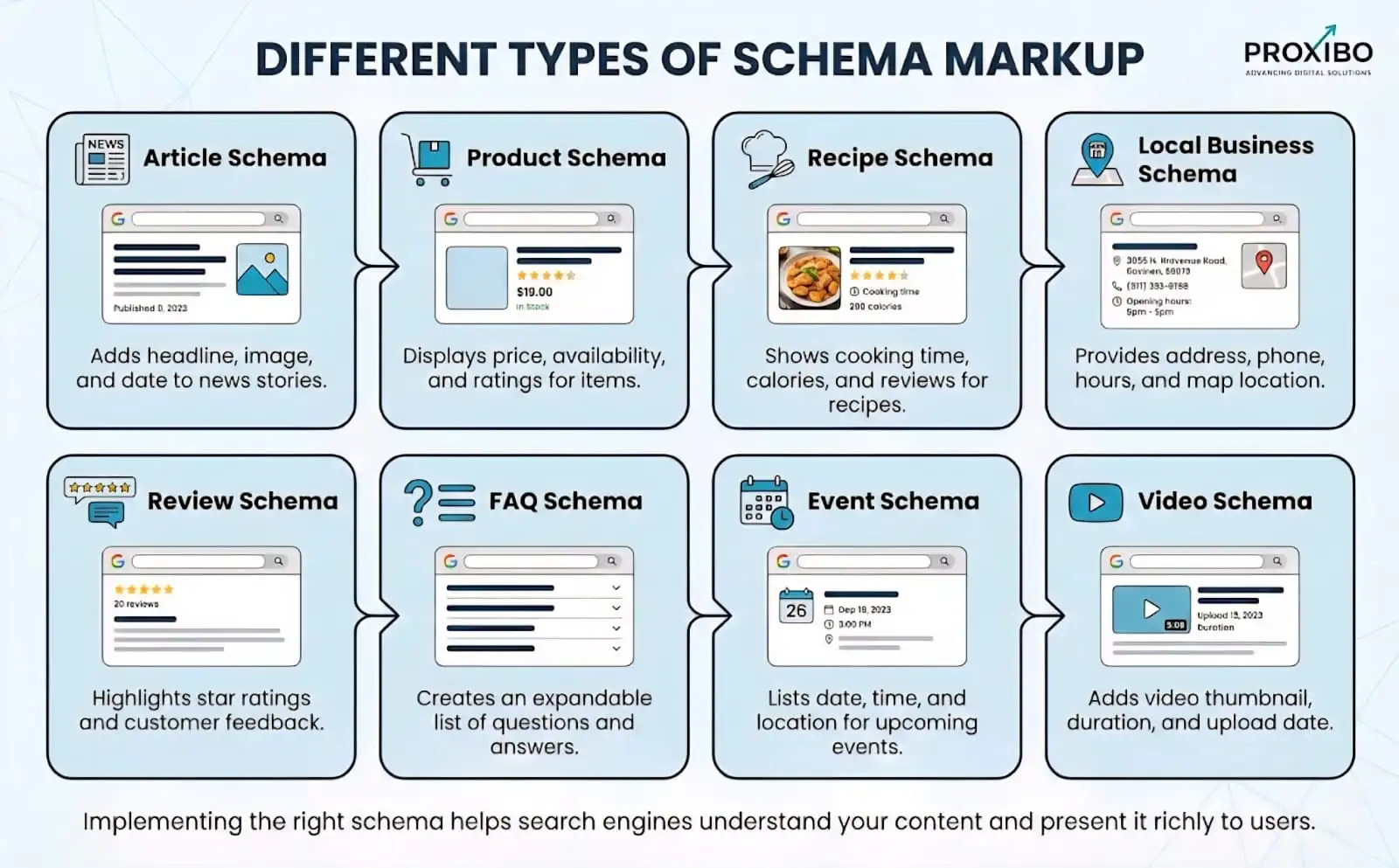
This type works for blog posts, news articles, and similar content. It can show publish dates, author names, and featured images in search results.
2. Product Schema
E-commerce websites need product schema. It displays prices, availability, ratings, and reviews directly in search results. This drives more qualified traffic to online stores.
3. Recipe Schema
Food bloggers use recipe schema to show cooking time, ratings, calories, and ingredients. These rich results catch attention immediately in recipe searches.
4. Local Business Schema
Local businesses benefit from this schema type. It shows business hours, location, contact information, and customer ratings. This helps people find and contact you easily.
5. Review Schema
This adds star ratings to your search listings. It works for product reviews, service reviews, and business reviews. Star ratings significantly increase click-through rates.
6. FAQ Schema
This displays your frequently asked questions directly in search results. Users can see answers without clicking through. However, helpful content still encourages visits.
7. Event Schema
Perfect for concerts, webinars, conferences, and other events. It shows event dates, locations, and ticket information in search results.
8. Video Schema
Video content gets enhanced with thumbnails, duration, and upload dates. This makes video results more appealing in search listings.
According to Ahrefs, websites using multiple relevant schema types see better overall visibility than those using just one type.
What Are the Best Examples of Schema Markup in Action?
1. Recipe Websites
A food blog adds recipe schema to its chocolate cake post. Search results now show a photo, 4.8-star rating, 45-minute cooking time, and 320 calories. This listing gets three times more clicks than their posts without schema.
2. E-commerce Product Pages
An online electronics store adds product schema to its headphone listings. Search results display the price, availability, and 4.5-star rating from 234 reviews. Shoppers see this information before clicking, which increases purchase-ready traffic.
3. Event Organizers
A conference organizer adds event schema to their registration page. Search results show the event date, location, and ticket prices. This clarity helps attract serious attendees who already know the details.
How Does Schema Markup Improve Click-Through Rates?
Click-through rate (CTR) measures how many people click your result when they see it. Schema markup significantly improves this metric.
Rich results stand out visually. While competitors display plain text, your listing enhanced with a clear H1 tag includes stars, images, and additional details. Eyes naturally gravitate toward the most engaging element on the page.
A schema provides information that helps users decide. A recipe showing cooking time helps busy people choose quick meals. Product prices help shoppers find options within their budget.
How to Add Schema Markup to Your Website?
Step 1: Choose Your Schema Type
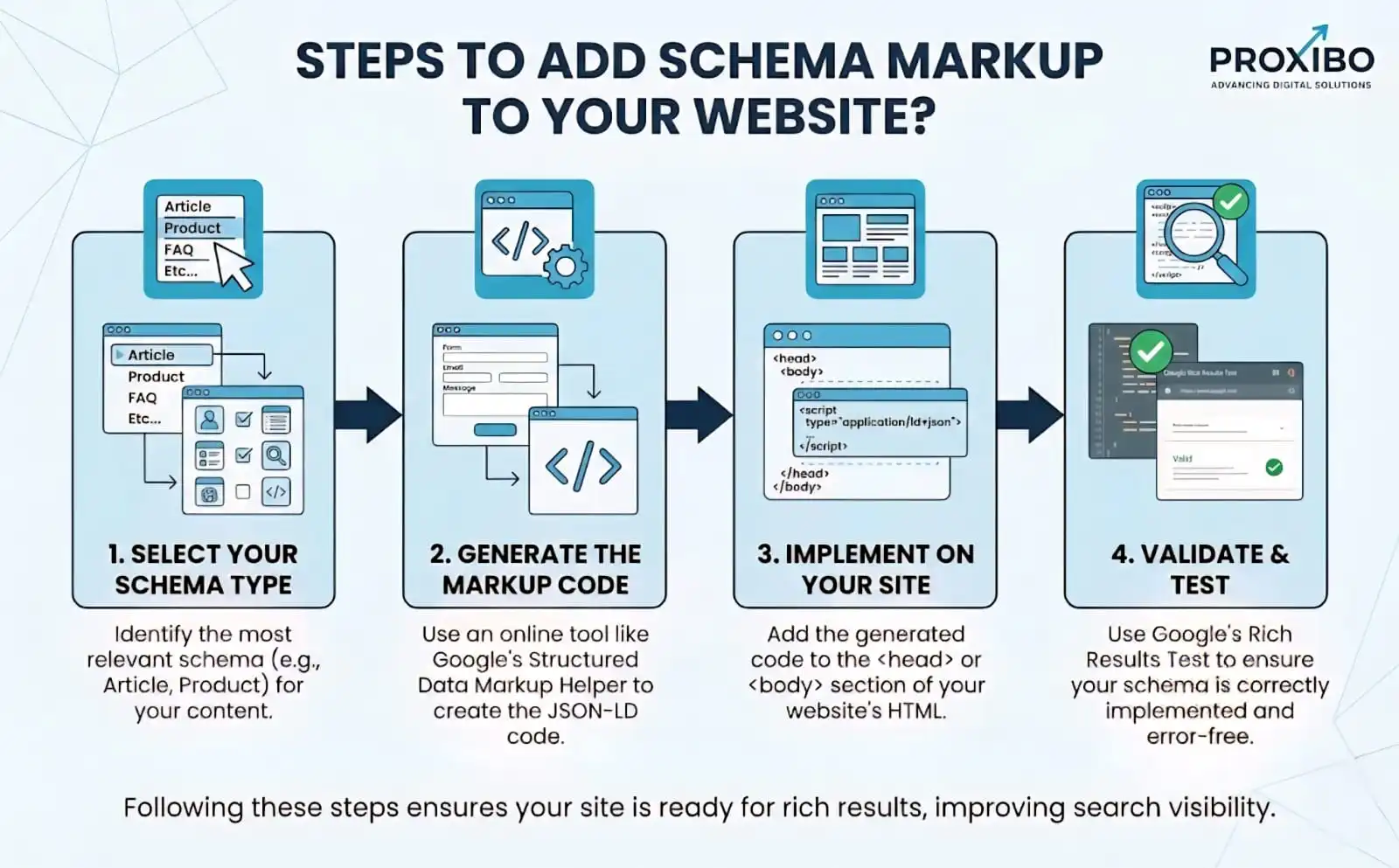
Identify which schema types match your content. Look at your most important pages first. Product pages need product schema. Blog posts need an article schema. Match schema to content type.
Step 2: Generate the Schema Code
Use Google’s Structured Data Markup Helper. This free tool guides you through creating schema code. You select your content type, input your URL, and highlight relevant information.
Alternatively, use schema generator tools available online. These tools create the code automatically based on the information you provide.
Step 3: Choose Your Format
Schema markup comes in three formats: JSON-LD, Microdata, and RDFa. Google recommends JSON-LD because it’s easiest to implement. This format keeps schema code separate from HTML.
Step 4: Add the Code to Your Website
Place JSON-LD code in your page’s HTML, typically in the <head> section. If you use WordPress, plugins like Yoast SEO or Rank Math can add schema automatically.
For specific pages, paste the code directly into your HTML editor. Make sure each page gets the appropriate schema type.
Step 5: Test Your Implementation
Use Google’s Rich Results Test tool. Enter your URL, and the tool checks if your schema works correctly. It shows errors and warnings you need to fix.
The Schema Markup Validator also helps verify that your code follows proper format. Fix any errors before publishing.
Step 6: Submit to Google Search Console
After adding the schema, request indexing through Google Search Console. This tells Google to recrawl your updated pages.
Conclusion
Does schema markup help SEO? Absolutely. Schema markup makes your search listings more attractive and informative, giving you an edge over competitors.
Start by adding schema markup to your most important pages, then test your implementation and monitor the results regularly. As search engines continue to evolve, the importance of schema markup in SEO will only grow. Learning these best practices through a trusted digital marketing institute can help you stay ahead and implement schema correctly for long-term success.
If you need expert guidance or want faster results, contact proxibo for professional support.
Frequently Asked Question
Schema markup typically appears within a few days to a few weeks after Google recrawls your pages. The timing depends on your site's crawl frequency and how often Google updates its index.
Yes, you can use multiple relevant schema types on one page.
Basic schema implementation doesn't require advanced technical skills. Tools like Google's Structured Data Markup Helper guide you through the process.
ABOUT THE AUTHOR

Related Posts