
How to Fix Technical SEO Performance Issues: Complete 2026 Guide

Your website looks great. The content is excellent. You’ve written amazing blog posts and created helpful resources.
But something’s wrong. Your traffic keeps dropping, and your rankings slide down every week.
Understanding how to fix technical SEO performance issue and when to invest in professional technical SEO services can dramatically improve your website’s performance. In this guide, we’ll explore exactly what technical SEO issues are and how to fix them step by step.
What Are Technical SEO Performance Issues?
Technical SEO performance issues are problems with how your website works behind the scenes. They also impact how quickly your pages load and how well they work on different devices.
Common Issues With the Website
include slow loading speeds, broken links, poor mobile experience, duplicate content, crawling and indexing problems. These issues frustrate both visitors and search engines.
Why Does Website Performance Affect Your SEO Rankings?
Page speed directly impacts user satisfaction. Research from Google shows that 53% of mobile visitors leave pages that take longer than three seconds to load. When people bounce away quickly, Google interprets this as a signal that your page doesn’t meet user needs.
Slow website SEO suffers because search engines can’t efficiently crawl sites with performance problems. If Googlebot struggles to access and understand your pages, those pages won’t rank well regardless of content quality.
Core Web Vitals became official ranking factors in 2021 and remain crucial in 2026. These metrics measure loading performance, interactivity, and visual stability. Websites failing these measurements lose ranking positions to faster competitors.
Mobile-first indexing means Google primarily uses your mobile site’s performance for ranking. With over 60% of searches happening on mobile devices globally, mobile performance issues directly hurt your overall SEO success.
What Are the Common Technical SEO Performance Issues?
- Website speed optimization problems top the list of technical SEO issues. Slow loading times frustrate visitors and signal quality concerns to search engines. Large image files, unoptimized code, and poor hosting are common causes of technical SEO speed issues.
- Broken links and 404 errors create dead ends for both users and search engine crawlers. Internal links pointing to deleted pages or external links to moved content both cause problems.
- Mobile usability issues prevent your site from working properly on smartphones and tablets. Small text, clickable elements too close together, content wider than the screen, and slow mobile loading all damage your mobile SEO performance.
- Duplicate content confuses search engines about which version to rank. Multiple URLs showing identical content, printer-friendly pages, and session IDs creating multiple versions all create duplication problems.
- Crawlability issues stop search engines from accessing and understanding your content. Blocked resources in robots.txt, broken XML sitemaps, poor internal linking structure, and JavaScript rendering problems all prevent proper crawling.
According to GTMetrix’s 2025 performance report, average page load times have increased despite better technology, making optimization more critical than ever.
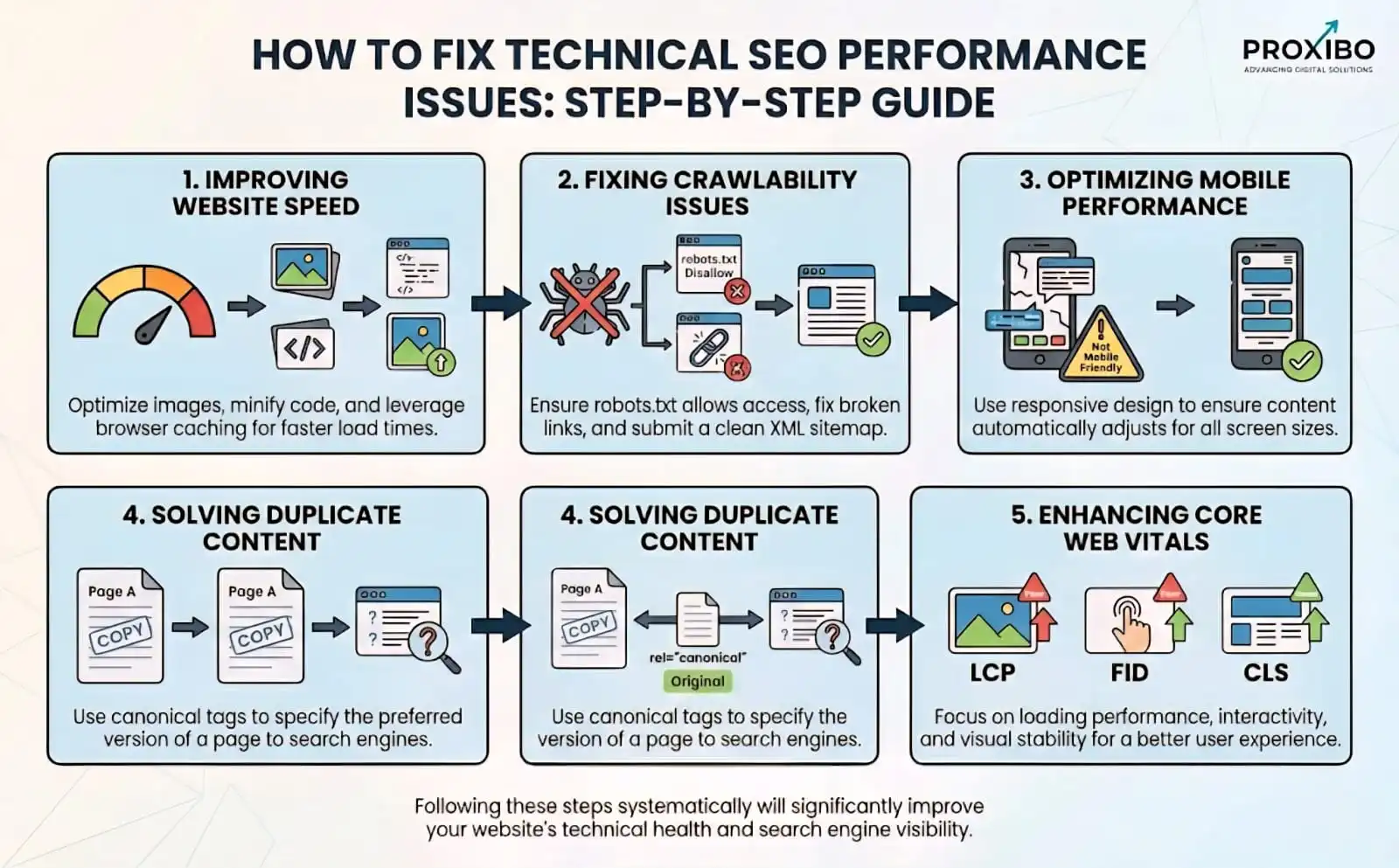
How to Fix Technical SEO Performance Issues: Step-by-Step Guide
1. Improving Website Speed
Website speed optimization requires addressing performance issues from multiple angles, as outlined in a technical SEO audit checklist. Start with image optimization by compressing all images without sacrificing visible quality, and use modern formats like WebP, which offer better compression than traditional JPEG or PNG files.
2. Fixing Crawlability Issues
Check your robots.txt file to ensure you’re not accidentally blocking important resources. Some websites block CSS or JavaScript files that Google needs to properly render pages. Use Google Search Console’s robots.txt tester to verify your file works correctly.
3. Optimizing Mobile Performance
Implement a responsive design that adapts to different screen sizes. Your website should look and work great on smartphones, tablets, and desktops. Increase touch target sizes so buttons and links are easy to tap on small screens. Elements should be at least 48×48 pixels with adequate spacing between them.
4. Solving Duplicate Content
Implement canonical tags that tell search engines which version of duplicate content to prefer. If you have printer-friendly versions or session IDs creating duplicates, canonical tags consolidate ranking signals to your preferred URL.
Use 301 redirects to permanently point duplicate URLs to the correct version. This approach works better than canonical tags when you control all duplicate versions.
5. Enhancing Core Web Vitals
Improve Largest Contentful Paint (LCP) by optimizing your server response time and ensuring your largest visible element loads quickly. This metric measures loading performance. Aim for LCP under 2.5 seconds.
Conclusion
Technical SEO performance issues can silently damage your website’s search rankings and user experience. Fixing these problems requires a systematic diagnosis and step-by-step solutions that focus on website speed optimization, mobile performance, Core Web Vitals, and a well-structured site architecture.
Start with quick wins such as compressing images, fixing broken links, and auditing key pages to build a solid technical foundation. Partnering with an experienced digital marketing company can help you resolve complex issues faster.
If you need expert support Contact Us to connect with our specialists who can guide you at every step.
Frequently Asked Question
Simple fixes like compressing images or fixing broken links take just hours or days to complete.
Start with issues directly affecting user experience and Core Web Vitals scores. Prioritize page speed problems since slow sites lose visitors immediately.
A technical SEO audit checklist is a step-by-step list used to review a website’s technical health, including crawlability, indexing, site speed, mobile usability, and overall search engine performance.
ABOUT THE AUTHOR

Related Posts