
Technical SEO Audit Checklist: Fix Website Issues & Improve Rankings

Your website looks perfect. The design is attractive, the content is informative, and you’ve invested in marketing.
Yet your traffic remains flat, rankings stagnate, and competitors keep pulling ahead—often due to hidden technical issues that require expert technical SEO services to identify and fix.
This guide provides a complete technical SEO audit checklist to help you uncover and resolve problems affecting your rankings. You’ll learn what to check, how to find issues, and exactly how to fix them to improve search visibility and long-term performance.
What is a Technical SEO Audit?
A website SEO audit examines the technical foundation of your website to identify issues preventing optimal search engine performance. This systematic review checks how well search engines can crawl, index, and understand your site.
Technical audits should happen at least quarterly for most websites. Sites making frequent changes need more frequent audits.
Why Do You Need a Technical SEO Audit Checklist?
- Technical SEO includes dozens of elements. Relying on memory means missing critical items. A checklist ensures you check everything important every time you audit.
- Small technical issues grow into major problems when ignored. Regular audits using a checklist catch issues early when they are easier and cheaper to fix.
- Different team members conducting audits reach the same conclusions when following standardized checklists. This consistency helps track improvements and compare results over time
- A good checklist helps you categorize issues by severity. Fix critical problems affecting many pages first, then address minor issues on low-traffic pages. This prioritization maximizes your return on effort.
- Checklists create records of what you checked and what you found. This documentation helps explain issues to stakeholders and proves you performed thorough audits.
What Are the Technical SEO Issues That Affect Rankings?
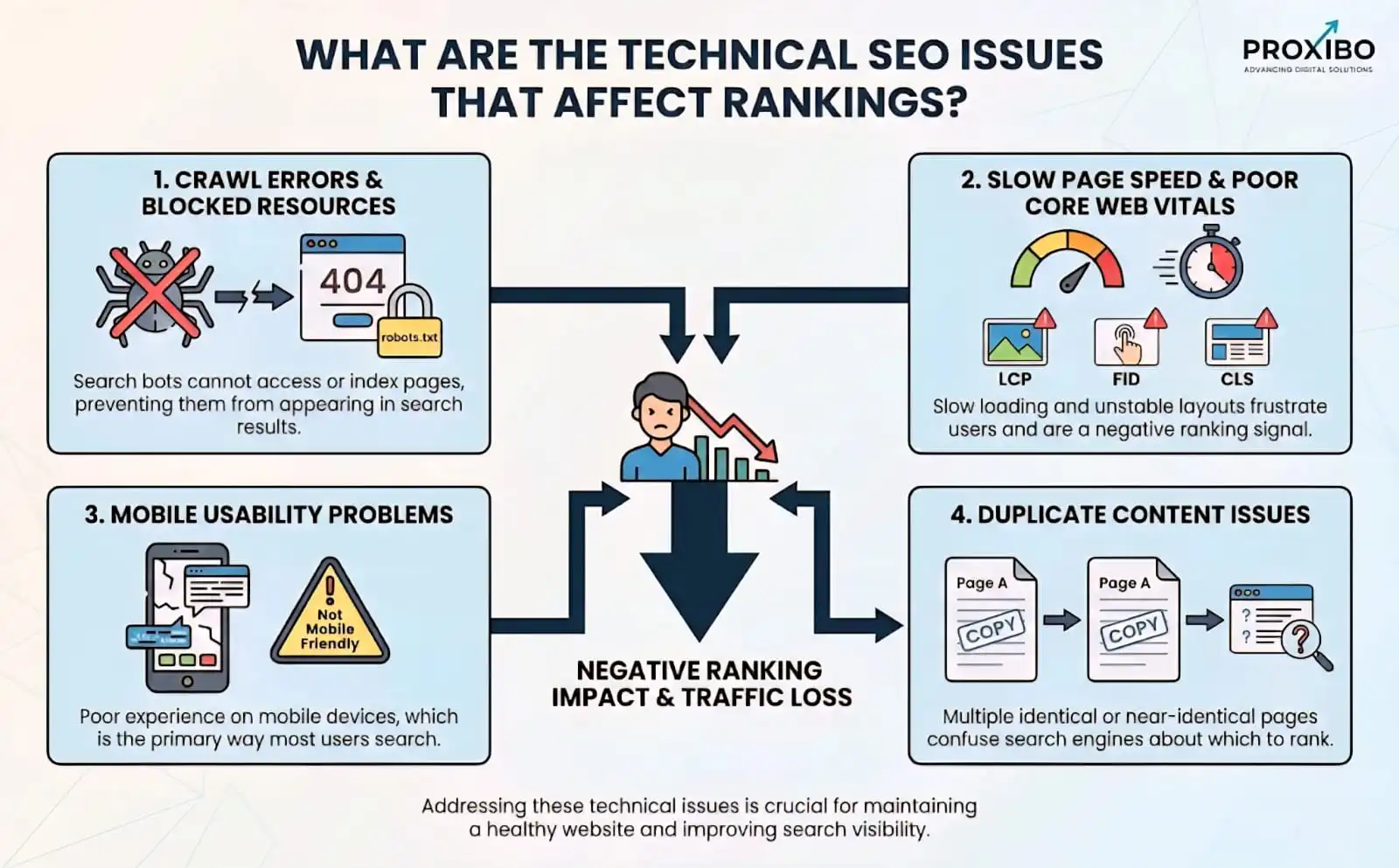
1. Crawl Errors and Blocked Resources
Crawl errors in SEO occur when search engines cannot access your pages. 404 errors indicate pages that no longer exist. 500 errors show server problems. Both prevent search engines from indexing content.
2. Slow Page Speed and Poor Core Web Vitals
Slow loading times frustrate users and hurt rankings. Google confirmed page speed as a ranking factor. According to a study by Google, 53% of mobile users abandon sites taking over three seconds to load.
3. Mobile Usability Problems
With mobile-first indexing, Google primarily uses your mobile site for rankings. Mobile usability issues create serious ranking problems. Common problems include text too small to read, clickable elements too close together, and content wider than the screen.
4. Duplicate Content Issues
Duplicate content confuses search engines about which version to rank. This dilutes ranking signals and reduces visibility. Common causes include URL parameters, printer-friendly versions, and similar pages without proper canonicalization.
What is the Complete Technical SEO Audit Checklist?
This comprehensive technical SEO audit checklist covers all critical elements you need to examine. Use this checklist for thorough audits that miss nothing important.
- Crawlability and Indexability Check
- Site Speed and Performance Analysis
- Mobile Optimization Review
- URL Structure and Site Architecture
- Duplicate Content and Canonicalization
- Security and HTTPS Implementation
- Structured Data and Rich Snippets
- International and Multilingual SEO
What are the Main Issues in Technical SEO?
1. Server Errors (500 Codes)
Prevent search engines from accessing your content entirely. These errors often indicate serious hosting or configuration problems needing urgent attention. Even temporary server errors can cause indexing drops if they persist.
2. Slow Core Web Vitals
Impact rankings across your entire site. Improving Core Web Vitals scores correlates with ranking improvements averaging 1-3 positions.
3. Blocked Resources
Prevent search engines from rendering pages correctly. Blocked JavaScript and CSS can make your entire site appear broken to Google.
4. Suboptimal Page Speed
Beyond Core Web Vitals still impacts user experience and conversions. Pages loading in 1-2 seconds convert significantly better than those taking 5+ seconds.
How Do You Fix Technical SEO Issues?
1. Prioritize by Impact and Effort
Create a spreadsheet listing all identified issues. Rate each by potential impact (high, medium, low) and effort required to fix (easy, moderate, difficult). Tackle high-impact, easy fixes first for quick wins.
2. Fix Issues in Logical Order
Fix foundational issues before surface-level problems. Ensure proper crawling and indexing before worrying about minor speed optimizations. Get the basics right first.
3. Test Fixes Thoroughly
Verify each fix works correctly before moving to the next issue. Use testing tools to confirm improvements. Check that fixes don’t accidentally create new problems.
4. Document Everything
Record what you fixed, when you fixed it, and what results occurred. This documentation helps you understand what works and justify future technical SEO investments.
Conclusion
A systematic technical SEO audit checklist helps you identify and fix issues that prevent optimal search performance. Regular audits catch problems early before they lead to significant ranking and traffic losses. Focus on critical issues first, then work through medium- and low-priority items in a structured way. Partnering with an experienced digital marketing agency can make this process faster and more effective. Prioritize your success and contact now to hire a professional team for your website.
Frequently Asked Question
Ensuring search engines can crawl and index your important pages is most critical. Without proper crawling and indexing, no other optimization matters since pages won't appear in search results.
Yes, you can conduct basic audits using free tools like Google Search Console, PageSpeed Insights, and Mobile-Friendly Test.
Yes, you can conduct basic audits using free tools like Google Search Console, PageSpeed Insights, and Mobile-Friendly Test.
Check your Core Web Vitals report in Google Search Console. If most URLs show "poor" status for any metric, this seriously impacts rankings and user experience.
ABOUT THE AUTHOR

Related Posts