What Is Technical SEO? Complete Guide to Technical SEO Best Practices

You’ve created quality content, researched the right keywords, and optimized your meta tags—yet your website still struggles to rank on search engines.
The missing piece? Technical SEO, which often requires expert technical SEO services to uncover and fix hidden issues.
This guide explains what technical SEO is, why it matters for your success, and how to implement best practices that improve your rankings and long-term search visibility.
What is Technical SEO?
Technical SEO is the work you do to help search engines find, read, and understand your website properly. Think about building a house. Before you worry about paint colors and furniture, you need a solid foundation, working plumbing, and electrical wiring that meets code. Technical SEO is the foundation for your website.
While content SEO focuses on the words people read and on-page SEO deals with titles and headings, technical SEO handles everything behind the scenes. It covers your site’s code, how fast pages load, and whether mobile phones can display your site properly.
How Technical SEO Fits Into the Bigger Picture
SEO has three main pieces that work together. Content SEO creates valuable information that answers questions and solves problems. Off-page SEO builds your site’s authority through backlinks and mentions. Technical SEO makes sure search engines can find and process everything properly.
You need all three pieces. Amazing content with terrible technical SEO will not rank well. The sites that dominate search results have solid technical foundations supporting quality content and legitimate authority.
Why Technical SEO Matters More Than You Think
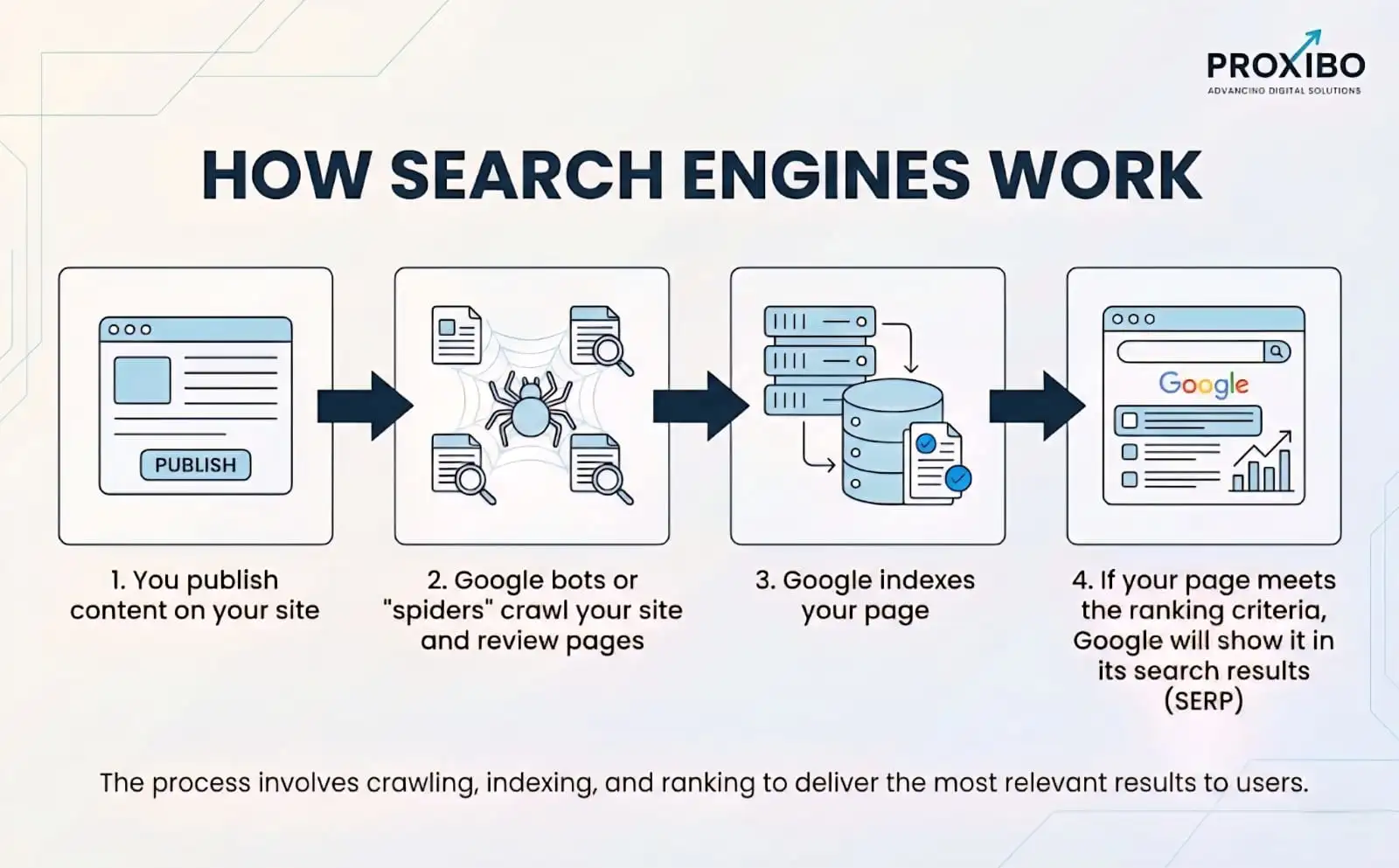
1. Search Engines Need to Crawl Your Site First
Before Google can rank your content, its crawlers need to discover and read every page. This sounds simple, but technical problems can block crawlers from accessing important pages.
A misconfigured robots.txt file can accidentally tell search engines to stay away from your entire site. Broken internal links create dead ends where crawlers get stuck. Server errors make pages look unavailable even when they work fine for human visitors.
2. Speed Directly Impacts Rankings and Sales
Page speed affects your site in two major ways. First, Google has confirmed they use speed as a ranking factor. Faster sites get a small boost, while really slow sites get penalized.
Second, and more importantly for your business, speed dramatically affects how many visitors convert into customers.
Portent research shows that sites loading in one second have conversion rates five times higher than sites taking ten seconds. Speed also affects how people experience your site.
3. Mobile Performance Is No Longer Optional
Mobile users now make up more than 60% of all web traffic. They search differently, have different needs, and definitely have less patience for sites that do not work properly on their devices. A site that is hard to use on mobile will lose rankings, lose visitors, and lose sales.
4. Technical Errors Cost You Traffic Every Day
What are the Challenges in Technical SEO?
1. Website Crawlability: Helping Search Engines Find Everything
Crawlability determines whether search engine bots can access and navigate through your entire website. Several technical elements control this access.
Robots.txt File:
This small text file sits in your site’s root directory and tells search engines which pages they can and cannot crawl. Common mistakes here cause major problems. People accidentally block important sections, forget to allow access to CSS and JavaScript files that search engines need, or leave old blocking rules in place after site redesigns.
XML Sitemaps:
Your sitemap is like a roadmap showing search engines all your important pages. A good sitemap includes every page you want indexed, organized logically, with priority levels indicating which pages matter most. Update your sitemap whenever you add or remove significant content, and submit it through Google Search Console and Bing Webmaster Tools.
Internal Linking Structure:
2. Site Speed and Core Web Vitals
Google’s Core Web Vitals measure specific aspects of page speed and user experience. These metrics directly affect rankings and represent real problems that hurt your conversions.
Largest Contentful Paint (LCP):
LCP measures how long it takes for the largest visible element on your page to load. This might be a hero image, a video, or a large text block. Good LCP is 2.5 seconds or less. Slow LCP makes visitors think your site is broken or unresponsive.
First Input Delay (FID):
FID tracks how long it takes for your page to respond when someone clicks a button or taps a link. Good FID is under 100 milliseconds. Long delays make your site feel sluggish and unresponsive, even if everything eventually works.
Cumulative Layout Shift (CLS):
CLS measures unexpected layout shifts that happen while a page is loading. You know that annoying experience where you are about to click something and the page shifts, making you click the wrong thing? That is a layout shift, and it drives users crazy. Good CLS is 0.1 or lower.
Common Ways to Improve Speed
- Compress images before uploading them; tools like TinyPNG or ImageOptim reduce file sizes by 70% or more without visible quality loss
- Enable browser caching so returning visitors load pages faster by storing certain files locally
- Use a content delivery network (CDN) to serve files from servers physically close to your visitors
- Minify CSS, JavaScript, and HTML files by removing unnecessary spaces and characters
Mobile Optimization That Actually Works
Mobile optimization goes way beyond just making your site viewable on smaller screens. Google uses mobile-first indexing, meaning it judges your entire site based primarily on the mobile version.
1. Responsive Design:
Your site should automatically adjust its layout based on screen size. Text should be readable without zooming. Images should resize to fit the screen. Navigation should work with finger taps, not just mouse clicks. Responsive design handles all of this automatically using CSS and proper coding.
2. Touch Elements:
Buttons and links need to be large enough for fingers to tap accurately – at least 48 pixels tall. They need enough spacing so people do not accidentally tap the wrong thing. Small, closely-packed links work fine with a mouse but create frustration on touch screens.
3. Mobile Page Speed:
Mobile connections are often slower than desktop broadband. Optimize aggressively for mobile by using smaller images, reducing the number of elements on the page, and prioritizing above-the-fold content. Test your site on actual mobile devices with real cellular connections, not just in desktop browser emulators.
Site Architecture and URL Structure
How you organize your site affects both users and search engines. Good architecture makes it easy to find information and helps search engines understand how different pages relate to each other.
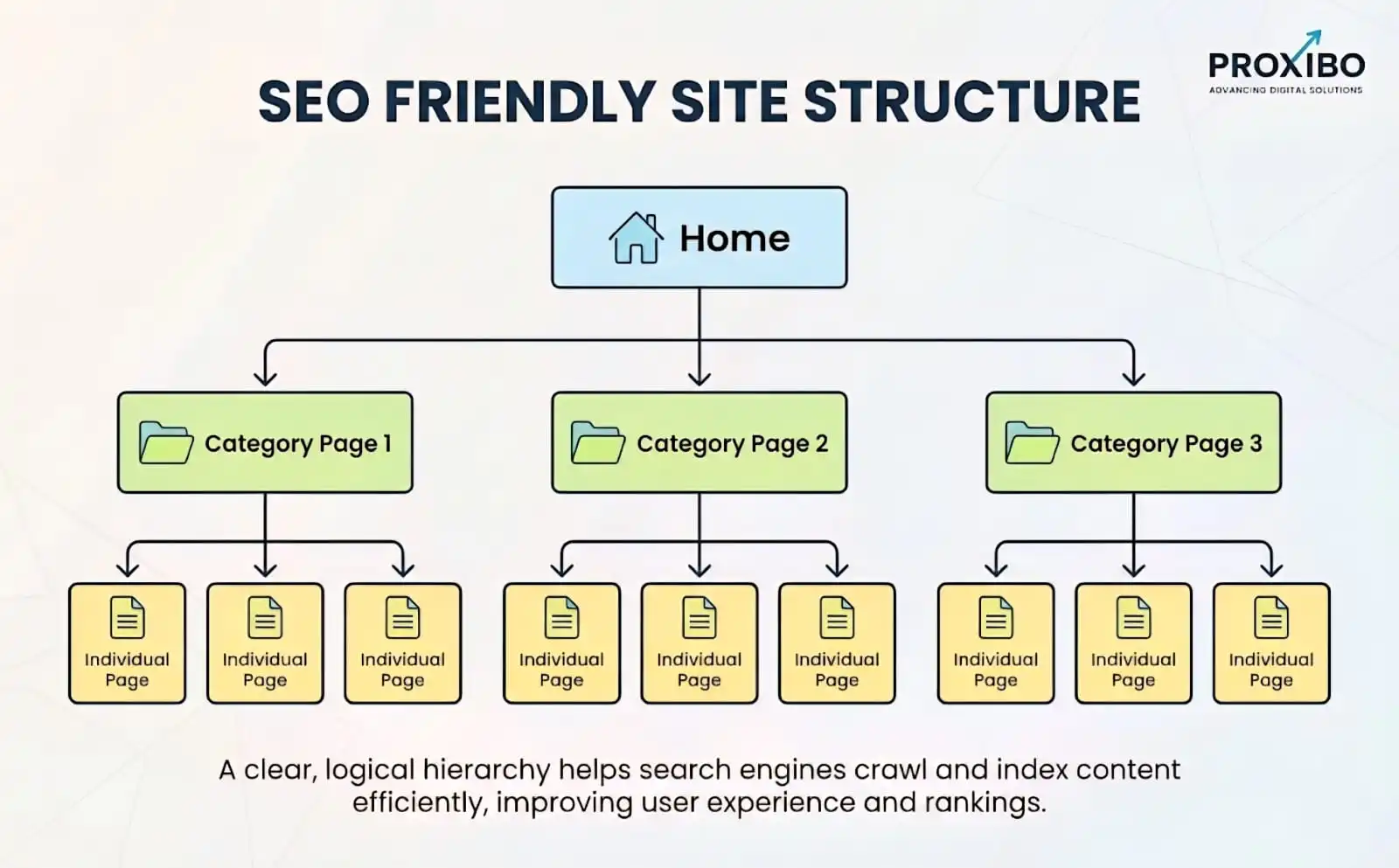
1. Logical Hierarchy:
Create clear categories and subcategories that make intuitive sense. Your homepage links to main category pages. Category pages link to subcategories or individual content pages. This pyramid structure helps visitors navigate and helps search engines understand which pages are most important.
2. Clean URLs:
URLs should describe what is on the page. Use hyphens to separate words. Include relevant keywords naturally. Avoid long URLs filled with numbers and parameters. A good URL like “yoursite.com/camping-gear/tents/4-season-tents” tells both users and search engines exactly what they will find.
3. Depth of Important Pages:
Keep your most important pages close to the homepage. Pages buried five or six clicks deep are harder for search engines to find and crawl, and users rarely make it that far either. If a page matters, make it easy to reach.
HTTPS and Website Security
HTTPS encrypts data traveling between your server and visitors’ browsers. This protects sensitive information like passwords and credit card numbers from being intercepted.
Google uses HTTPS as a ranking signal, giving a small boost to secure sites. More importantly, modern browsers display scary security warnings on sites without HTTPS. These warnings kill trust and drive visitors away before they even see your content.
Structured Data and Schema Markup
Structured data is code you add to pages that gives search engines specific information about your content. It uses a standardized format called schema markup that search engines can easily read and understand.
While regular content tells search engines what words are on your page, structured data tells them what those words mean. It can identify products with prices and reviews, articles with authors and publish dates.
Your Complete Technical SEO Checklist
This checklist covers the essential technical SEO tasks organized by priority. Start with critical issues that prevent crawling and indexing, then move to speed and mobile optimization, and finally tackle more advanced improvements.
1. Crawling and Indexing (Critical Priority)
- Create an XML sitemap that includes all important pages and submit it to Google Search Console and Bing Webmaster Tools
- Check your robots.txt file to make sure it is not blocking important pages or resources
- Fix all crawl errors shown in Google Search Console – these indicate pages that search engines cannot access
- Remove or noindex pages you do not want in search results, like admin pages, duplicate content, or thin pages
2. Site Speed Optimization (High Priority)
- Test your Core Web Vitals scores using Google’s PageSpeed Insights and aim for passing scores in all three metrics
- Compress all images to reasonable file sizes .
- Enable browser caching with proper cache control headers so returning visitors load pages faster
- Implement lazy loading for images below the fold to speed up initial page rendering
3. Mobile Optimization (High Priority)
- Use a responsive design that automatically adjusts layout for different screen sizes
- Pass Google’s Mobile-Friendly Test with no errors
- Make sure text is readable without zooming – use at least 16px font size for body text
- Size touch elements at minimum 48×48 pixels with adequate spacing between them
4. URL and Site Structure (Medium Priority)
- Use descriptive, keyword-rich URLs that clearly indicate page content
- Keep URLs reasonably short while maintaining clarity – under 100 characters when possible
- Use hyphens to separate words in URLs, not underscores or spaces
- Implement a logical site hierarchy with important pages within three clicks of the homepage
5. Security and Technical Elements (Medium Priority)
- Install an SSL certificate and enable HTTPS across your entire site
- Set up 301 redirects from all HTTP pages to their HTTPS versions
- Fix mixed content warnings where some elements still load over HTTP
Technical SEO Best Practices for 2026
1. Make Core Web Vitals Your Top Priority
Google has made it clear that page experience matters for rankings. Core Web Vitals are the specific metrics they measure. Your goals should be Largest Contentful Paint under 2.5 seconds, First Input Delay under 100 milliseconds, and Cumulative Layout Shift below 0.1.
These are not just arbitrary numbers. They represent real problems that hurt user experience and conversions. Sites that pass all three Core Web Vitals metrics see better rankings and better business results. Make this your starting point for speed optimization.
2. Handle Pagination Properly
If your site has many products or blog posts split across multiple pages, you need a proper pagination setup to avoid duplicate content problems. Two main approaches work.
The first option uses rel=”next” and rel=”prev” tags in your HTML to tell search engines how paginated pages relate to each other. This helps them understand that page 1, page 2, page 3, etc., are all part of the same content series.
The second option creates a “View All” page showing all items on one page, then uses canonical tags on the paginated pages pointing to that complete version. This tells search engines that the View All page is the main version to index.
3. Target Featured Snippets With Smart Formatting
Featured snippets are the highlighted answers that appear above regular search results. Landing in position zero brings significantly more traffic. Featured snippets get click-through rates around 8.6%, roughly double what the regular first position gets.
4. Fix Duplicate Content Problems
Duplicate content confuses search engines about which version of a page to rank. This often results in neither version ranking as well as a single version would.
Common sources of duplicate content:
- HTTP and HTTPS versions of the same page are both accessible
- WWW and non-WWW versions both working (pick one and redirect the other)
- Multiple URLs showing the same content due to parameters or session IDs
- Product variations with nearly identical descriptions
5. Set Up International SEO Correctly
If you serve multiple countries or languages, proper international targeting prevents search engines from showing the wrong language version to users. This requires hreflang tags that indicate language and regional variations of your pages.
Hreflang tags tell search engines “this page is in English for US visitors, this page is the same content in Spanish for Mexican visitors, and this page is the same content in French for Canadian visitors.” Without these tags, search engines might show your Spanish content to English speakers or vice versa.
6. Monitor and Fix Regularly
Technical SEO is not a one-time project. Sites develop problems over time as you add content, make changes, and as search engine requirements evolve. Set up regular monitoring to catch issues early.
Monthly technical checks should include:
- Reviewing Google Search Console for new crawl errors, security issues, and manual penalties
- Checking Core Web Vitals scores and investigating any pages that fail
- Testing site speed on both desktop and mobile devices
- Scanning for broken internal and external links
Biggest Technical SEO Mistakes to Avoid
1. Blocking Search Engines by Accident
This happens more often than you would think. During site development, someone adds a noindex tag or blocks crawlers in robots.txt to keep the unfinished site out of search results. Then, when the site goes live, nobody removes those blocks.
2. Ignoring Mobile Until Problems Show Up
Some site owners assume their desktop site works fine on mobile without actually checking. Then rankings drop,p and they discover their mobile site is a mess of broken layouts, tiny text, and unclickable buttons.
3. Forgetting About Speed After Initial Optimization
Sites get slower over time. You add more features, larger images, additional tracking scripts, and more plugins. Each addition slows things down a little. Eventually, your once-fast site becomes sluggish.
4. Using Too Many Redirects
Redirect chains slow down your site and waste crawl budget. A redirect chain happens when URL A redirects to URL B, which redirects to URL C, which finally redirects to URL D. Each redirect adds delay and makes search engines work harder.
Conclusion
Technical SEO for websites creates the foundation that allows great content to rank well. Focus on making your site fast, mobile-friendly, secure, and easy for search engines to crawl and understand. Implement the technical SEO checklist systematically, addressing critical issues first. Working with an experienced digital marketing agency can help ensure these improvements are implemented correctly and efficiently.
The ideal title tag length is 50–60 characters. Use the title tag examples from this guide to create effective titles for different page types. Start with the most important pages and systematically optimize the rest of your site. If you need expert support, contact us today to get professional guidance and results-driven solutions.
Frequently Asked Question
Basic technical SEO can be done without coding through content management system settings and plugins.
Technical SEO creates the foundation, but cannot guarantee rankings alone. You also need quality content, proper on-page optimization, and backlinks.
A technical SEO audit ensures your website is crawlable, indexable, fast, mobile-friendly, and error-free so search engines can rank it properly.
ABOUT THE AUTHOR

Related Posts